

Microsoft made Aion Instruct the built-in language model in Edge on November 19. Websites can use it to work with text directly on the device. For instance, an editor in the browser could offer a shorter version of a paragraph without sending that paragraph to an external model.
The first run is what users are most likely to notice. Edge downloads the model when a site, extension, or browser feature needs it. There is a change for developers too. They can now try the Prompt API on a site that already serves visitors.
What Aion Instruct does in Edge
Aion Instruct replaces Phi-4-mini as the small language model built into Edge. It has 2.3 billion parameters, and Microsoft has published the weights on Hugging Face. Developers can download those model files separately if they want to work with Aion outside Edge.
In the browser, the Prompt API provides access to the model. It lets a page or extension send a text task and get a response. A site might turn meeting notes into a short summary. The site adds that action to its own interface and decides what to show while the result is being prepared.
With local processing, the device that opened the page computes the answer. For those calls, the site does not pay a cloud model provider to handle the request. Speed depends on the device, and the best way to judge quality is with the kind of text visitors will actually use.
A good place to start is shortening a paragraph the user wrote. Keeping the original nearby makes it easy to spot a date that disappeared or a number that changed. A response can sound confident without checking its sources. A site can offer a separate mode for work that needs more than a simple rewrite.
When Edge downloads the model and how much space it needs
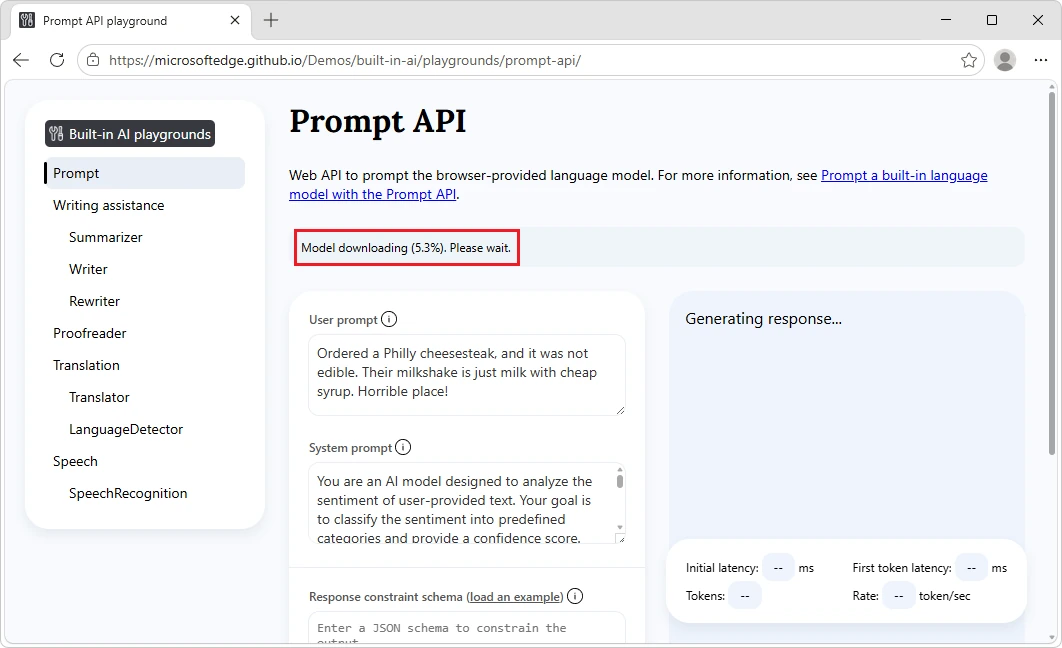
Edge keeps the model on the device and can share it across sites. This can make the first run take longer. Once the files are in place, another page using the same model does not have to download them again.
Microsoft lists these requirements for the current Prompt API preview.
| Requirement | What Microsoft lists |
|---|---|
| Platform | Windows 10 or 11, or macOS 13.3 or later. Linux needs x64, Vulkan GPU drivers, and Edge 159 or later. |
| Storage | At least 20 GB free on the volume containing your Edge profile. |
| Graphics | A GPU with at least 3 GB of video memory. |
| Network | Edge downloads the model over an unmetered connection. |
The 20 GB figure is a free space requirement. It does not describe the size of the Aion download. If free space drops below 5 GB, Edge can remove the model to make room for other browser features. On a nearly full drive, a feature you used before may need to download the model again after you make more room.
During testing, Microsoft points developers to edge://on-device-internals to check the device performance class Edge assigned. That helps distinguish a computer limitation from a problem on the page. If the model is unavailable on one laptop, the site may still be using the API correctly.
Where to turn off local models
In Edge, open Settings → Copilot and AI and look for On-device AI. Turning it off deletes downloaded local model files and prevents future downloads. Sites or extensions that rely on local processing may lose some features.
You can turn the setting back on. Edge will download the required model when a supported feature requests it and the device meets the requirements. On-device AI is off by default in the Beta, Dev, and Canary test channels. Microsoft says this keeps the model from downloading separately for each installed channel.
How websites can test the Prompt API
Microsoft previously offered Prompt API testing in preview builds of Edge. It now has an origin trial. A site owner registers an address and adds the supplied token to the pages that need access. In a supported version of Edge, visitors can try the feature on the live site. The trial runs for a limited time, and devices still have to meet the requirements.
Before offering the feature, a site can check the status with LanguageModel.availability(). The model can be ready, available to download, downloading, or unavailable. Each state calls for different feedback. If a download is in progress, show how far along it is. If the model is unavailable, the text should still be editable by hand.
A site can also connect a cloud service for devices that cannot use the local model. That changes where the text is processed. For a draft that should only go to a server with the user’s consent, for example, the site can ask before using the cloud route.
What can work without an internet connection
After the initial download, Aion can compute a response offline. The webpage still needs to be open or able to run offline on its own. If signing in to an editor needs a server, the local model will not make sign-in work offline. The same goes for fetching the source text from a cloud drive.
Local processing describes the request to the model. The page can still make other network requests, such as saving the document. It helps visitors when a site explains where a summary is created and where the finished text is saved. Those are separate actions even if one button starts both.
When the Decisions API fits
Microsoft also introduced an experimental Decisions API. It takes a set of choices and evaluates which are relevant to a piece of text. For a message like “Has my order shipped yet?”, those choices might be Delivery, Returns, and Payments.
The site gets scores for the choices and a measure of the model’s confidence. If the result is unclear, it can let the person choose a category. To draft the reply itself, the Prompt API is a better fit. Microsoft’s current Decisions API instructions describe testing in Edge Canary. Both interfaces are still evolving, so starting with a single feature makes it easier to adapt as they change.
A confidence score helps sort requests, while an action may still need confirmation. A model might assign a message to Returns. The site can bring up the appropriate form and ask the person to confirm what they want. One short message then helps them find the right part of the site.




Join the conversation
Stay on topic and respect other readers. Your first comment may appear after editorial review.