
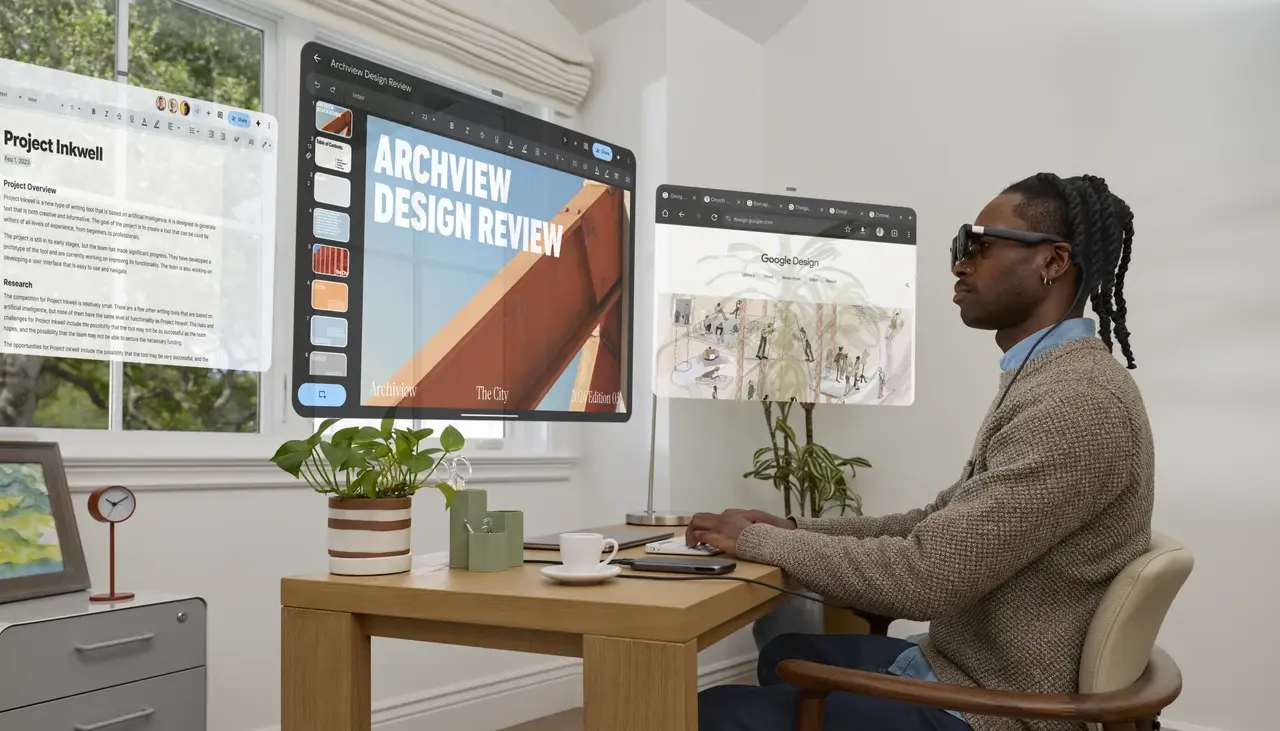
Google and XREAL have launched AURA, Android XR glasses that place virtual windows in your field of view while keeping the physical surroundings visible. Orders opened on October 28 in the United States, Canada and South Korea; Japan is scheduled for November 2. Shipments are expected from mid-November, so being available to order does not mean being available for immediate delivery.
AURA combines glasses, a separate computing unit and Android applications. Before buying, it is useful to understand what the system can replace, how a laptop connects and whether its services support your country. This article examines official information; our newsroom has not tested the device. Cover: Google / XREAL promotional visualisation of a spatial workspace.
Light glasses, with the computing unit carried separately
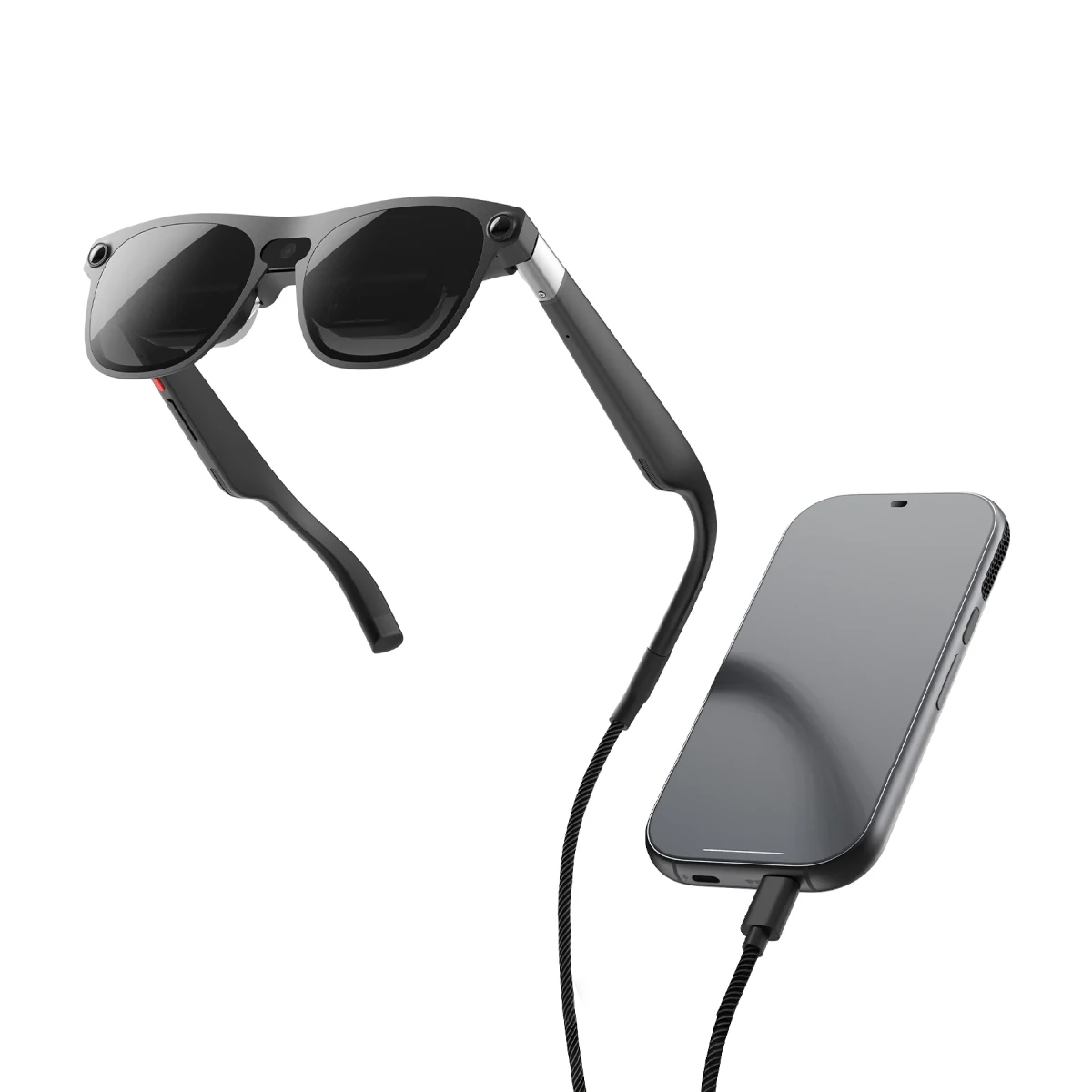
AURA’s transparent optics let you see the room directly through the lenses. App imagery appears over that space, with adjustable dimming. The glasses have cameras and tracking, while the main processor, battery and touchpad sit in a separate cable-connected unit called the Puck.
XREAL lists approximately 95g for the glasses and 265g for the Puck. The equipment in your bag therefore weighs more than the number resting on your nose. Travelling involves another device, a cable and a charging plan. At a desk, consider where the Puck can sit without the cable pulling on the glasses when you turn your head.
| Specification | Manufacturer’s claim | What to check for your use |
|---|---|---|
| Displays | 1920 × 1200 per eye; up to 120 Hz | Small-text readability in your applications |
| Field of view | 70° | Comfort when moving between multiple windows |
| Memory / storage | 12 / 256 GB or 16 / 512 GB | The final price of your selected configuration |
| Fit | M: 60–66 mm; L: 66–72 mm IPD | Your interpupillary distance and any prescription-lens requirements |
A large virtual screen does not increase the displays’ physical pixel count. A demonstration featuring several enormous windows cannot establish whether a spreadsheet is comfortable to read throughout a working session. During a fitting, open a typical document, adjust it to a comfortable scale and assess how much information you can actually use at once.
Connecting a laptop
Google describes Wired Mirroring over USB-C with video-output support: your computer display appears as a window alongside Android XR apps. This wired mode needs no additional software. The Puck has a dedicated glasses port and a separate charging / DP-in port.
- Check the laptop specification for video output through the particular USB-C port. Connector shape alone does not establish its capabilities.
- Use a compatible cable that carries video. A cable that charges your phone may not support this task.
- Confirm the correct Puck port and the power arrangement for the complete setup. Keep the video input separate from the glasses connection.
- Try the application and text-entry workflow you actually need. For longer work, assess a separate Bluetooth keyboard and mouse or the laptop’s existing input devices.
Mirroring places the computer’s image in your field of view; its applications continue running on the computer itself. For gaming, that makes AURA a potential personal display. Compatibility with a particular PC VR platform, controllers or stereoscopic mode needs a separate check: video input alone does not establish it.
Where the format could be useful
The clearest scenarios are watching a film without a large physical display, working at a temporary desk and keeping reference windows beside a main task. A writer might place notes alongside a document, or a traveller might compare a map with an itinerary. These are suggested uses, not a promise that glasses make every workflow faster.
Before replacing a desktop monitor, check the less spectacular details: typing, returning to a particular window, seeing the keyboard and collaborating with someone nearby. If showing the display to another person is central to your work, a personal screen requires another way to share the view. Our approach to assessing whether a paid tool is useful can also help when considering a larger collection of digital tools.
Gemini: a private display does not answer every privacy question
Google’s help page explains that enabling Share your view shares the full available view with Gemini, including digital content and visible physical surroundings. On the glasses, dimming must be off to share the room. That matters when client documents, private messages or people who have not agreed to appear are nearby.
Close unnecessary windows and decide what is appropriate to share before starting. Turn off view sharing when finished. Separately, Settings → Security and privacy → Privacy lets you review app permissions and microphone access. A bystander being unable to see your virtual screen does not establish what information you are sending to a service. For work material, use our AI privacy checklist.
Price, countries and the decision before ordering
The introductory US price starts at $1,099 through the end of 2026. Higher-priced bundles include a keyboard or controller; taxes and delivery conditions are established at checkout. XREAL lists the basic package as glasses, Puck, carrying case, USB-C cable, nose pads and a prescription-lens frame. The frame does not replace having the required prescription lenses made.
For wired XR glasses, Gemini’s help page currently lists Canada, Japan, South Korea and the United States, a personal Google Account and a minimum age of 18. XREAL has not confirmed launch dates for other regions. If ordering through an intermediary, establish service availability, warranty and return conditions in your country first; physical delivery does not guarantee those things.
The practical decision is to buy for a particular verified use and confirm fit, configuration, laptop compatibility and total cost before paying. If those checks are unavailable, waiting for a fitting and independent tests is reasonable. AURA offers an interesting approach to a mobile workspace, but its value will depend on how comfortably it handles your everyday task.


Join the conversation
Stay on topic and respect other readers. Your first comment may appear after editorial review.