
Google introduced Gemini 4 Hydrogen on November 12. It is a new model for fast everyday work: writing, explaining difficult topics, coding, and completing tasks through connected tools. It is coming to the Gemini app, Google Search, and developer services.
The most noticeable change is access without a subscription. There is a detail worth understanding, though: in the free Gemini app, automatic model selection can choose Hydrogen for a suitable prompt. This does not promise a separate button with unlimited model access. Here is how access works and what the update changes.
Where Gemini 4 Hydrogen is available
Google is launching the model across several products. The name stays the same, but access and billing depend on where you use it.
| Product | What Google announced |
|---|---|
| Gemini app | Access across plans. On the free plan, automatic model selection can bring Hydrogen into a conversation. |
| Google Search | A global upgrade to AI answers; the interface depends on the Search features available to you. |
| Google AI Studio and Gemini API | The model is available on free and paid tiers, with the relevant limits. |
| Google Antigravity | The announcement specifies paid Google AI Pro and Ultra subscribers. |
| Gemini in Google Sheets | Rollout begins with Google AI Pro, Ultra, and eligible business subscriptions. |
For ordinary conversations, the Gemini app is enough. AI Studio is a separate workspace where you can select a model for a prompt or prototype. The API lets a developer connect the model to a website or application. A consumer app subscription and API billing are different ways of using the service.
Automatic selection in free Gemini means the service decides which model a prompt needs. The absence of a manual Hydrogen selector does not prove the update leaves you out. Equally, a response without model information does not let you identify with certainty which model produced it.
How Hydrogen differs from Carbon and Argon
Google describes Carbon and Argon as models for difficult tasks that need extended analysis. Hydrogen is intended to execute everyday work and individual parts of larger jobs faster. In development, that can mean editing code, running tools, and checking the result.
The choice depends on the work. For a short email, getting clear writing in the right tone quickly matters most. Finding the cause of a difficult software bug may benefit from deeper analysis. This is not a strict division of abilities: Hydrogen can reason, and Carbon can handle ordinary requests.
We have already covered access to Gemini 4 Carbon separately. Hydrogen expands the choice, without transferring Ultra’s access terms to a free account.
What changes in Google Search
In Search, Google emphasizes better understanding of long questions and answers with images, tables, and links. When a question has several parts, the system can search related topics in parallel and bring the findings into one response.
A question about a small apartment, for example, might include a budget limit, a need to hide the bed from video calls, and a requirement to keep a usable work area. Google shows Hydrogen taking these conditions into account and adding visual options. This is the company’s example, rather than a promise of the same result for every home.
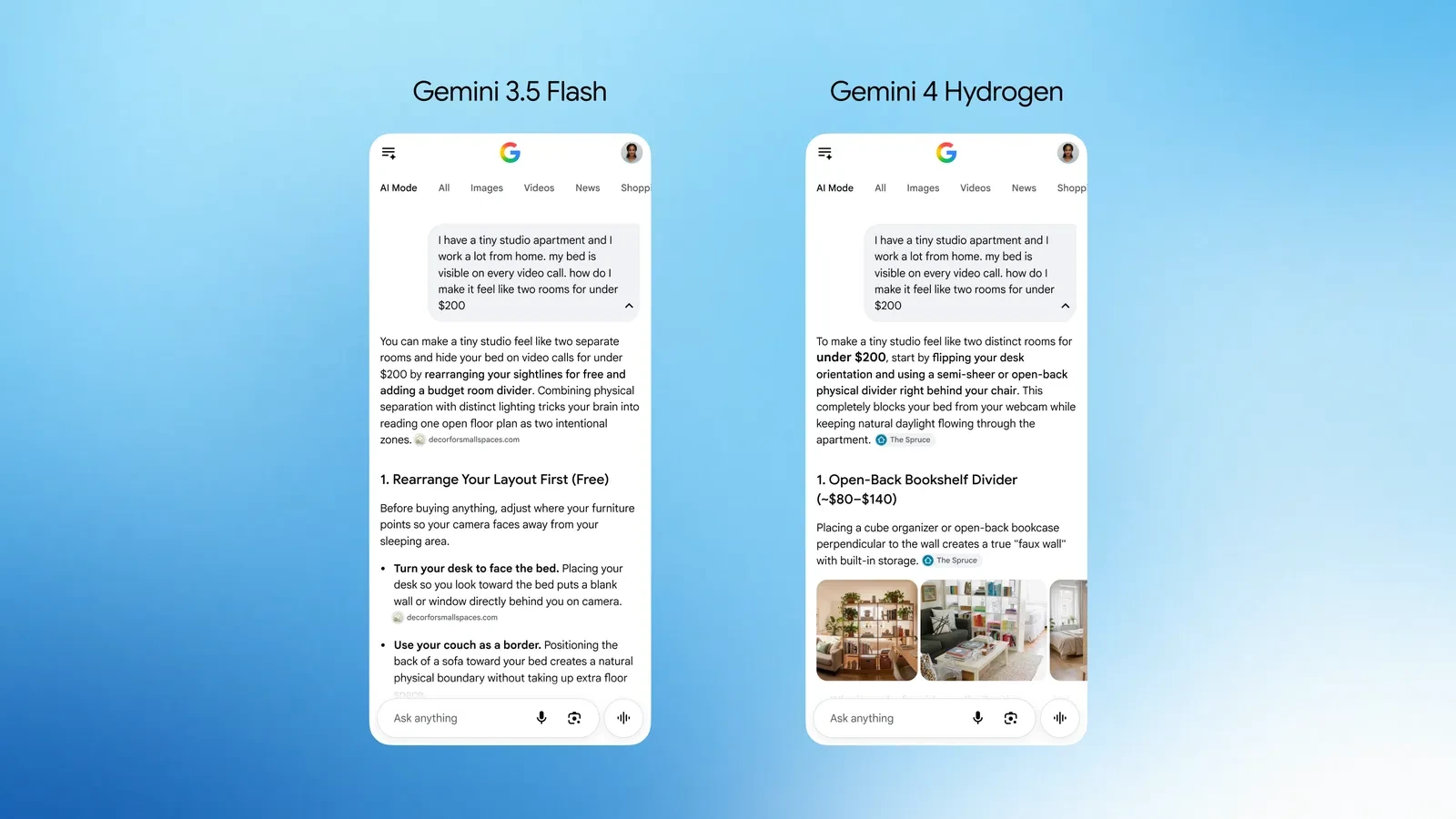
Google also says the update brings a broader range of useful links and better understanding across supported AI Mode languages. That may reduce the number of follow-up searches. Prices, stock, and service terms still depend on the source, however: the links in an answer remain useful, especially when information changes quickly.
File support goes beyond a text prompt
The Hydrogen API documentation lists text, images, video, audio, and PDF as inputs. This model’s output is text. It can analyze several kinds of material, but “supports images” does not, by itself, mean this API generates pictures.
The context window is approximately one million tokens. Context is the amount of material a model can consider within a task. A token is a small piece of text or a representation of other data, rather than necessarily a whole word. With this model, input and output share one overall limit.
A large window helps with long documents or code, but it does not guarantee careful attention to every line. When asking about a contract or report, a specific question and a reference to the relevant section can help produce a more focused answer than asking about the entire file at once.
Four thinking levels let developers adjust the tradeoff
Hydrogen offers developers low, medium, high, and xhigh thinking levels. High is the default. These settings control how much effort the model puts into internal analysis before answering.
A higher level can help with demanding tasks, but it increases waiting time and processing costs. Rephrasing a paragraph and investigating a software fault have different needs. The useful measures are the quality of the finished answer and how long it takes, rather than the longest possible thinking process.
This API setting is not an instruction to find four identical switches in every Gemini app. Products can expose model capabilities differently. Similarly, Google’s speed claims describe the comparisons it presents; they do not determine how long each of your conversations will take.
What paid API use costs
Standard Hydrogen pricing is $1.50 per million input tokens and $7.50 per million output tokens. Input includes the material and instructions sent to the model. Billable output can also include thinking tokens, so the length of the visible reply does not always explain the whole charge.
To put the rates in perspective, 100,000 input tokens cost $0.15, while 10,000 billable output tokens cost $0.075. Together, that is $0.225 before any separate tool charges. This is an arithmetic example at standard rates, rather than an estimate for a particular number of chats.
A long conversation history, attachments, and tool use change how much data gets processed. The free tier has its own quotas, while paid use is metered. These calculations are unnecessary for personal chats; they matter when you build an assistant into a service of your own.
Why Antigravity now has Orchestrator
Alongside Hydrogen, Google introduced Orchestrator in Antigravity. It can combine Carbon for difficult decisions with Hydrogen for individual execution steps during the same working session.
For a developer, that means less manual model switching. For someone using ordinary Gemini, it is a separate feature in another product with its own access terms. The broader change is simpler: a new model is beginning to handle some everyday requests and AI answers in Search, including without a required subscription.


Join the conversation
Stay on topic and respect other readers. Your first comment may appear after editorial review.