

Do not paste passwords, authentication codes, payment-card details, identity documents, confidential client files, identifiable health records, or anyone else’s private data into a consumer AI chat. For ordinary work, share only the minimum information needed, replace real identifiers with neutral labels, and upload a clean extract instead of the original file.
This applies to ChatGPT, Gemini, Claude, Microsoft Copilot, and Perplexity. Privacy controls reduce particular uses of data but do not make every input harmless. A training opt-out is not deletion, temporary modes do not mean zero processing, and a work subscription is not permission to disclose data you do not own.
The 30-second rule before you send anything
Pause and ask three questions:
- Would this cause harm if it appeared in the wrong account, support ticket, shared link, or screenshot?
- Do I have the right to share every person’s and organization’s data in it?
- Can the task work with less detail, substituted values, or a synthetic example?
If the first answer is yes, the second is uncertain, or the third is yes, do not send the original. Redact it, create a smaller extract, use an organization-approved environment, or keep the task offline.
Download the printable checklist
A4, one page. Keep it by a workstation or attach it to your organization’s AI-use policy.
A traffic-light test for AI inputs
| Level | Typical examples | RozumTech recommendation |
|---|---|---|
| Red: do not send | Passwords, private keys, full ID scans, card data, confidential customer lists, raw medical records, unreleased security details | Keep out of consumer AI. Use the approved specialist system or do the task locally. If a credential was exposed, rotate it. |
| Amber: sanitize first | Internal email, a contract clause, support logs, meeting notes, a spreadsheet with personal or commercial context | Remove names and unique identifiers, keep only relevant fields, generalize values, and verify the cleaned copy before upload. |
| Green: usually low risk | Public documentation, your own non-confidential draft, invented sample data, a generic question without identifiable details | Still check copyright, accuracy, account history, public-sharing settings, and whether a connector adds private context. |
This is an editorial risk model, not a provider guarantee or legal classification. “Green” means lower risk, not absolute safety. Regulated organizations may have stricter rules; an approved enterprise workflow may lawfully process some information that is red for a personal account.
Information you should never paste into a public consumer AI service
1. Credentials and access secrets
Never share a password, one-time code, recovery phrase, MFA backup code, API key, private cryptographic key, access token, session cookie, database connection string, or password-reset link. Logs and screenshots often contain these secrets without labeling them as such.
2. Payment and banking data
Do not upload full card numbers, security codes, bank-login details, payment links, complete account numbers, or unredacted statements. A budgeting question rarely needs the original document. Replace merchants with categories and use rounded amounts or a small table you created yourself.
3. Identity documents and reusable identity proof
Passport and driving-licence scans, national identification numbers, tax numbers, visas, birth certificates, handwritten signatures, face images used for verification, and answers to security questions can support impersonation. For help with a form, use a blank official copy or only the confusing field label.
4. Other people’s personal information
A person giving you their email, résumé, complaint, transcript, photo, address, or phone number did not automatically consent to it being submitted to an AI provider. This includes customers, applicants, employees, students, relatives, and meeting participants. Remove direct identifiers and details that could identify someone when combined, such as an exact job title, rare diagnosis, small town, and precise date.
5. Confidential work and client material
Do not paste an NDA-covered document, private roadmap, acquisition plan, source list, unpublished results, bid, pricing model, customer database, or full contract into a personal account. Paying for an individual premium plan does not convert it into your employer’s approved workspace. Freelancers should agree on AI use before processing client material; our AI workflow for freelancers explains how to make that boundary visible to a client.
6. Medical, biometric, and intimate information
Full medical records, prescription labels, laboratory reports with identifiers, genetic data, therapy notes, voiceprints, fingerprints, and intimate images deserve a much higher threshold than an ordinary productivity prompt. A general health question can often be reframed without a name, record number, facility, exact appointment date, or document upload. AI output is not a diagnosis and should not replace a qualified professional.
7. Children’s data
Do not upload a child’s face, school report, location, schedule, health record, voice, or identifying story for a summary or creative result. Consent and education rules may also apply.
8. Security details and raw production logs
Private repository code, unpatched vulnerability details, internal hostnames, firewall rules, cloud architecture, customer IDs, and production dumps can reveal more together than each line suggests. Remove secrets and identifiers, isolate the smallest reproducible fragment, and substitute domains, IP addresses, paths, and sample records. For highly sensitive work, consider an approved environment or a carefully configured local AI model—while remembering that local software, plugins, telemetry, and the device itself still need security.
9. Legally privileged, restricted, or unreleased material
Litigation strategy, privileged correspondence, export-controlled technical data, sealed records, unpublished research, and information subject to a retention hold need specialist review. The convenience of a summary is not a basis for overriding a contract, professional duty, court order, or data-processing agreement.
How the five services handle data: checked 26 July 2026
The entries summarize provider documentation for consumer use and important business differences. They are provider facts, not RozumTech promises. Controls can vary by region, age, feature, account, and administrator, so check your own setting before a sensitive task.
| Service | What the provider currently says | What that does not mean |
|---|---|---|
| ChatGPT | Personal users can turn off “Improve the model for everyone” for new chats. Temporary Chats are not used for training, do not appear in history or create memories, and are deleted from OpenAI systems after 30 days. OpenAI says business products and the API are not used for model training by default. | Turning off training does not delete chat history. Temporary processing, abuse monitoring, legal exceptions, connected apps, shared links, and your organization’s own retention still matter. |
| Gemini | Google lets users manage Gemini Apps Activity, its auto-delete period, and use for improving Google AI. Temporary chats and future chats created while Keep Activity is off are not used for model improvement unless feedback is submitted, but Google retains them with the account for up to 72 hours to provide and protect the service. The default activity auto-delete period is 18 months; reviewed data can be retained separately for up to three years. Google says qualifying Workspace customer data is not used to train or improve underlying models outside Workspace without permission, while history and retention are administrator-controlled. | Deleting Gemini activity does not erase data another connected service received. A 72-hour operational window is not zero retention, and some eligible chats may receive human review. |
| Claude | Anthropic says consumer chats may improve Claude when the user enables Model Improvement or otherwise explicitly opts in. A conversation flagged for safety review may be analyzed to improve Usage Policy detection and enforcement, including models used by the Safeguards team. Incognito chats are not used for model improvement. Deleted consumer conversations are removed from the back end within 30 days, subject to stated exceptions. Anthropic does not use Claude for Work and API inputs or outputs for model training by default. | Submitting feedback can preserve the related conversation for up to five years. Incognito still has safety and legal processing exceptions. Turning off model improvement or deleting an ordinary chat cannot undo training already in progress or completed. |
| Microsoft Copilot | Signed-in consumer users can control whether conversations are used for model training and can delete conversation history separately. Microsoft’s dedicated File Upload page says consumer uploads are stored for up to 18 months and their content is not used for training, while the broader Copilot Privacy FAQ says training may include uploaded files according to the user’s model-training choice. Microsoft 365 Copilot Chat prompts and responses are not used to train foundation models. | The two current consumer pages are not fully consistent, so opt out of training and do not treat consumer Copilot as a confidential-file channel. A Microsoft 365 tenant may retain interactions for audit or eDiscovery, and it is a different environment from consumer Copilot. |
| Perplexity | For Free, Pro, and Max accounts, AI Data Retention is enabled by default and can be turned off for future training collection. Perplexity says the opt-out does not remove previously collected training data. Enterprise queries are not used for training; its uploaded files are retained for seven days under the documented Enterprise protections. | The consumer opt-out does not stop processing needed to run, secure, legally operate, or improve the service. A Pro subscription is not an Enterprise data agreement. |
RozumTech recommendation: turn off optional model improvement on a personal account, use temporary or incognito mode for low-sensitivity one-off work, and regularly review history, memories, public links, and connected apps. Then apply the same minimization rules anyway. Settings are a second layer of protection, not permission to upload the original secret.
If you are still choosing a platform, see our practical ChatGPT vs. Gemini vs. Claude comparison and overview of AI tools for work. Privacy depends on the exact account and workflow, not only the model name.
The minimum-necessary workflow
- Name the output. “Find unclear wording in clause 7” is narrower than “review this entire contract.” A precise task reduces the input you need.
- Choose the approved environment. Check whether the task belongs in a personal account, a managed business workspace, a specialist regulated system, or no cloud AI at all.
- Make a disposable copy. Never redact the only original. Extract the relevant page, columns, function, or paragraph into a new file.
- Replace, generalize, and remove. Change names to roles, unique IDs to stable placeholders, exact dates to relative dates, and real values to ranges when precision is unnecessary. Remove hidden content as well as visible text.
- Inspect the final payload. Open the exported copy, search for names, email addresses, domains, tokens, and comments, and read the actual prompt once more before sending.
- Verify the answer outside the chat. AI can omit a clause, misread a table, or invent a detail. Our introductions to ChatGPT and starting with AI explain why human review remains part of the workflow.
Five before-and-after examples
| Task | Do not send | Safer input |
|---|---|---|
| Rewrite an email | A complete thread with names, addresses, signatures, order number, private attachment, and prior replies | “Rewrite this politely for a supplier. We received [product category] five days late and need a revised delivery date by Friday.” Include only the two sentences that need editing. |
| Understand a contract | The entire signed agreement containing parties, pricing, bank details, signatures, and confidential schedules | Copy one clause into a clean note; replace names with [Client] and [Provider], values with [fee], and jurisdiction only if needed. Ask for plain-language issues to discuss with a qualified lawyer, not a final legal conclusion. |
| Debug an error | A production log containing an API bearer token, customer email, internal hostname, request body, IP address, and repository path | Keep the error type, sanitized stack trace, relevant 20-line function, dependency versions, and steps to reproduce. Use example.com, TEST_USER_01, 192.0.2.1, and TOKEN_REMOVED consistently. |
| Ask a medical question | A portal screenshot showing full name, birth date, patient number, clinic, clinician, prescriptions, and complete test history | “Adult in their 30s; symptom has lasted about one week; currently taking [medicine class]. What warning signs require urgent care, and what questions should I ask a clinician?” Do not use AI as a diagnosis. |
| Analyze a spreadsheet | A workbook with all customers, hidden columns, emails, addresses, invoice IDs, comments, and historical tabs | Create a new CSV with only category, month, and rounded amount; remove rows that can single out a person. For formula help, use five synthetic rows with the same column structure. |
For document-heavy tasks, use the step-by-step guide to working with PDF files through AI. It covers page selection and result checking; the privacy rule here comes first: the model rarely needs every page.
Files and screenshots: the hidden-data checklist
A black box over a screenshot or deleted visible cells may leave underlying information in the file. Before uploading a copy, check:
- file name, folder path, document title, author, company, revision history, comments, and tracked changes;
- headers, footers, footnotes, speaker notes, annotations, form fields, embedded files, links, and QR or barcodes;
- hidden spreadsheet sheets, rows, columns, formulas, named ranges, filters, pivot caches, and cells outside the visible area;
- PDF text beneath an image, OCR layers, attachments, digital signatures, bookmarks, and document properties;
- photo EXIF data such as time, device, and location, plus faces, badges, screens, reflections, labels, and addresses in the background;
- screenshot browser tabs, bookmarks, account avatar, email address, notifications, calendar items, taskbar, window title, and neighboring messages.
Export a clean file, reopen it, and try to select or search the redacted area. When possible, recreate the excerpt as plain text. “Flattened” is not automatically anonymous.
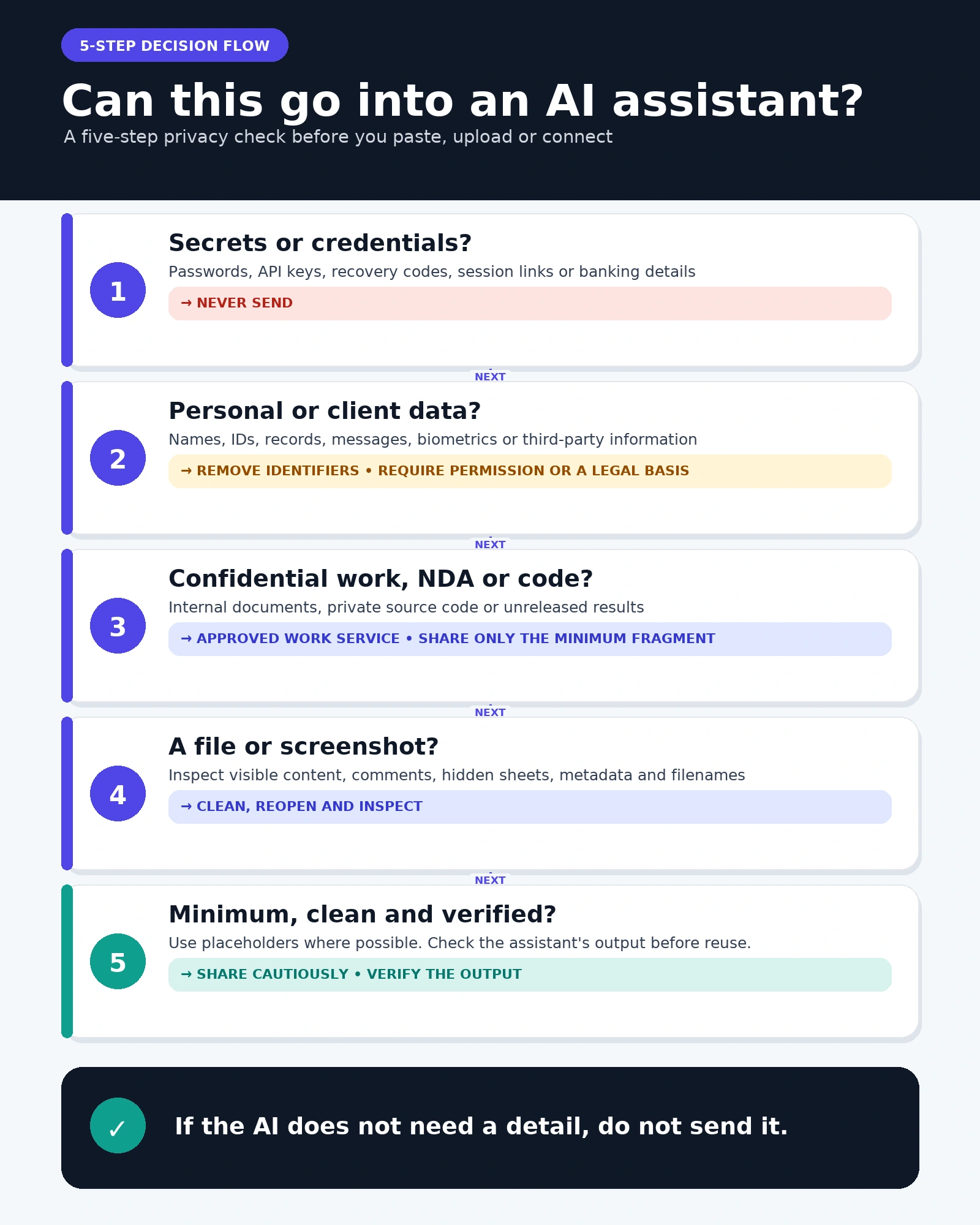
A practical decision flow
- Is the information public, invented, or yours to disclose? If no or uncertain, stop and obtain permission or use another method.
- Does it contain a credential, identity proof, payment secret, or high-impact personal record? If yes, do not upload it to a general consumer service.
- Does the task genuinely need real data? If no, use a synthetic example. If yes, reduce it to the smallest relevant extract.
- Is this a work task? Verify the organization’s approved product, plan, contract, retention, region, administrator settings, and allowed data class. A familiar logo is not enough.
- Can a connector, memory, public link, or agent expand exposure? Disable unnecessary access and require confirmation before external actions.
- Have you inspected the exact final payload? Only then send it, and delete the working copy according to your retention policy after the task.
Connectors and agents change the risk
A normal chat sees what you type or upload. A connected assistant may also search email, calendars, cloud drives, code repositories, customer systems, or browser pages; an agent may send messages, create files, or update records. The useful context is therefore larger, and so is the possible blast radius of a mistaken instruction, compromised extension, overbroad permission, or malicious instruction hidden inside a document.
Grant read-only access first, connect a limited folder or test account rather than an entire workspace, review scopes, disable unused connectors, and require human approval for sending, publishing, purchasing, deleting, or changing permissions. Check the third party’s privacy policy too: deleting an AI chat may not delete data already sent to the connected service. Our guide to AI agents explains the difference between an answer and an action.
Meeting tools deserve special care because one recording contains several people’s voices and statements. Establish consent and retention before recording, then follow the guides to choosing an AI transcription tool and creating AI meeting notes you can verify.
What to do after sharing something by mistake
- Stop further exposure. Do not keep discussing the secret. Remove public share links, revoke connector access if relevant, and delete the chat or uploaded file using the provider’s controls.
- Treat credentials as compromised. Rotate exposed passwords, keys, tokens, cookies, recovery codes, and connection strings from the authoritative system. Sign out other sessions and review recent access. Editing or deleting the prompt is not a substitute.
- Protect financial or identity accounts. Contact the card issuer, bank, document issuer, or appropriate identity-protection service for your country. Monitor activity and follow their fraud instructions rather than relying on the chatbot’s response.
- Report a work incident promptly. Tell the security, privacy, legal, or responsible manager what data, account, service, connectors, recipients, and time were involved. Do not conceal it or create more copies. Preserve only the evidence your incident process requires.
- Check every persistence point. Review conversation history, memories or saved information, projects, uploaded-file libraries, feedback reports, public links, browser extensions, connected apps, and downstream actions.
- Use the provider’s privacy channel if necessary. A deletion request may help, but providers describe exceptions and time windows. Record the request and response for an organizational incident.
Turning off model training after the incident is not deletion. It commonly affects future collection or future training use, while deletion is a separate control. It also cannot remove information from a model-training run already completed, from another service that received it, or from a public link someone copied.
A one-page AI privacy policy for a small team
A useful policy can start with ten decisions:
- Owner: name the person who approves services and handles incidents.
- Approved accounts: list the exact products, plans, login method, and permitted devices—not just provider brands.
- Data classes: define what is allowed, what requires sanitization, and what is prohibited.
- Minimum necessary: require excerpts, synthetic samples, and disposable copies by default.
- Third-party rights: require client approval, lawful authority, and recording consent where applicable.
- Connectors and agents: use least privilege, approved scopes, and confirmation for external actions.
- Feedback: prohibit thumbs-up/down submissions on conversations containing internal material unless specifically approved.
- Human review: assign accountability for facts, decisions, code, and outgoing content.
- Retention and deletion: specify history, exported copies, transcripts, public links, and offboarding.
- Incident path: give one immediate reporting route and a no-blame expectation for fast disclosure.
The fuller small-business AI use policy template adds procurement, quality checks, ownership, and review. Revisit the privacy section whenever a provider adds memory, browser control, a new connector, or autonomous actions.
Frequently asked questions
Does turning off AI training make a chat private?
No. It limits a stated use of eligible data, but the service still processes the input to answer, may retain history or security records, and may apply legal or abuse-prevention exceptions. Deletion, memory, public links, feedback, and connectors have separate controls.
Are Temporary Chat or Incognito modes safe for confidential documents?
They can reduce history, memory, and training exposure under the provider’s current terms, but they are not a universal confidential-data channel. OpenAI documents a 30-day deletion period for Temporary Chats; Anthropic and Google describe their own exceptions and processing. Continue to redact and use an approved business environment when the material is sensitive.
Can I use a paid personal plan for company data?
Price is not the deciding factor. Your employer or client must approve the exact account type and workflow. A personal Pro or Plus plan can have different terms, administrator controls, retention, and legal commitments from a Business, Enterprise, Workspace, or Microsoft 365 environment.
Can I upload a contract if I remove the names?
Sometimes names are only one identifying or confidential element. Pricing, dates, project details, unusual clauses, signatures, metadata, and tracked changes can reveal the parties. Prefer the single relevant clause, replace business details consistently, and obtain authorization. AI can explain wording but is not your lawyer.
Is a screenshot safer than copying text?
Often it is riskier because it captures unrelated context: tabs, notifications, account names, faces, locations, and neighboring messages. Crop a new copy and inspect every edge. Plain text containing only the necessary excerpt is usually easier to audit.
Can I safely ask AI about medical symptoms?
You can ask a general, de-identified educational question, but avoid uploading a complete identifiable record to a general consumer chatbot. Use emergency or professional care when appropriate, verify health information, and use only a properly approved service for regulated clinical data.
Are local AI models automatically private?
No. A model may run on your device while its launcher, extension, analytics, update system, cloud fallback, or connected tools still transmit data. Disk encryption, malware protection, access controls, backups, model source, and network behavior remain part of the assessment.
Where should a beginner start?
Begin with public or invented material and one narrow task. Our guide to starting with AI shows the first workflow; use this checklist before every prompt.
Methodology and limitations
RozumTech reviewed the providers’ public help, privacy, and enterprise documentation available on 26 July 2026, separated personal products from managed commercial offerings, and recorded only claims supported by those official pages. We did not independently audit provider infrastructure. The traffic-light model, redaction workflow, examples, and team-policy checklist are RozumTech recommendations designed to reduce unnecessary disclosure; they are not provider statements or legal, medical, or security advice. Product names, defaults, controls, and retention terms can change, so follow the linked source and your organization’s current agreement before relying on a setting.
Update log
- 26 July 2026: First publication. Verified consumer training controls, temporary modes, deletion and retention statements for ChatGPT, Gemini, Claude, Copilot, and Perplexity; added redaction examples, connector risks, and an accidental-sharing response plan.




Join the conversation
Stay on topic and respect other readers. Your first comment may appear after editorial review.