
Samsung announced the One UI 9.5 beta for the Galaxy S26 series on November 18. The camera gets new manual controls, and individual apps can be locked behind a fingerprint or screen lock. Samsung also updated accessibility controls and added a journal to Samsung Health.
Enrollment happens through Samsung Members. Availability depends on the country and the specific phone, so some Galaxy S26 owners may see the beta card while others do not.
Who can join the beta?
Samsung named Germany, India, South Korea, Poland, the United Kingdom, and the United States in its global announcement. The program starts with the Galaxy S26 series. The announcement does not give beta dates for other Galaxy devices or a schedule for the stable update.
To check your phone, open Samsung Members and sign in with your Samsung account. Look for a Beta Program banner or card. Samsung’s general program guide says eligible devices and enrollment periods can vary by country. The card lets you check the conditions for the phone you are using.
The program is free to join. Enrollment and installation are separate steps. First apply in Samsung Members. Once you have access, you can download the update on the phone. If you enroll and change your mind before installing, you can leave through Samsung Members and keep using your current version.
Lock individual apps when the phone is unlocked
One UI 9.5 introduces App Lock. If you hand someone an unlocked phone to show a photo, for example, you can keep the calendar behind its own lock. On opening a locked app, Samsung asks you to verify your identity with biometrics or your screen lock.
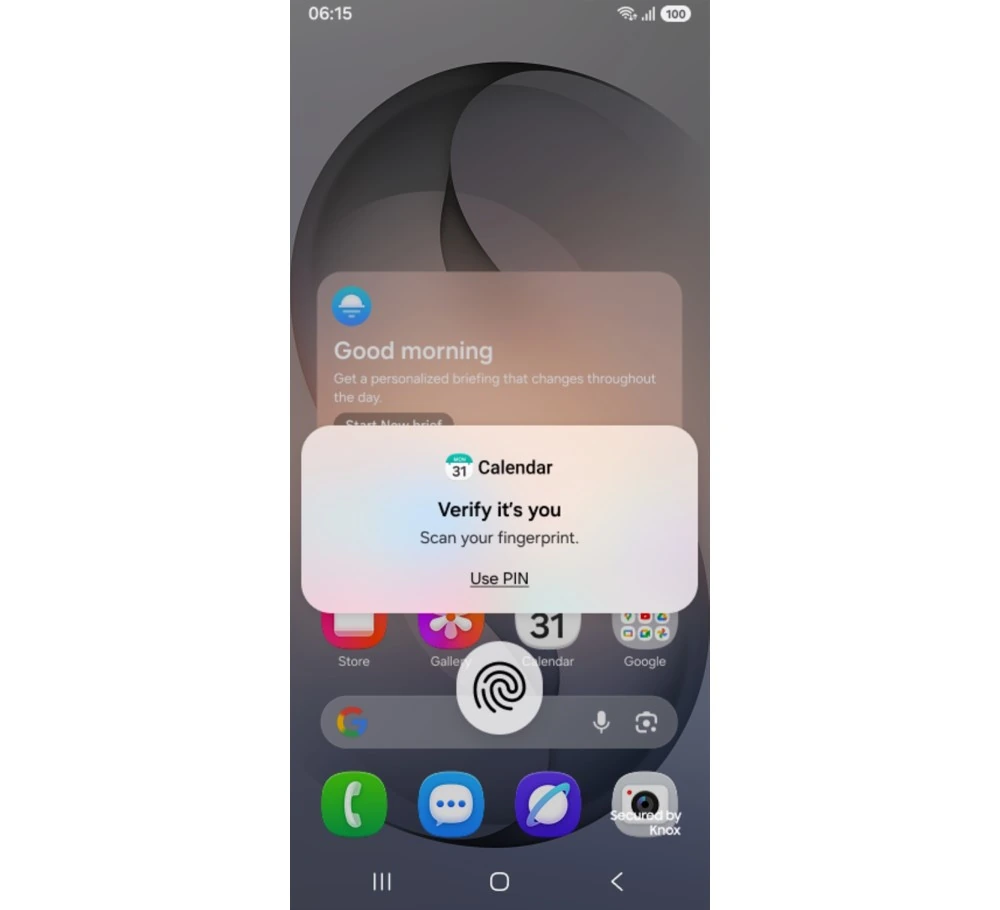
Samsung says the contents of a locked app’s notifications and widgets also stay hidden. That matters because a meeting title or message preview can show up before anyone opens the app itself. Samsung’s illustration shows a fingerprint request when the user tries to open Calendar.
If family members occasionally use your phone, you can apply the setting selectively. You might lock a calendar that contains work meetings and keep the camera or calculator available. Samsung’s announcement shows how the feature works. Look for its exact location and authentication options in the build available for your device.
Camera controls are easier to reach
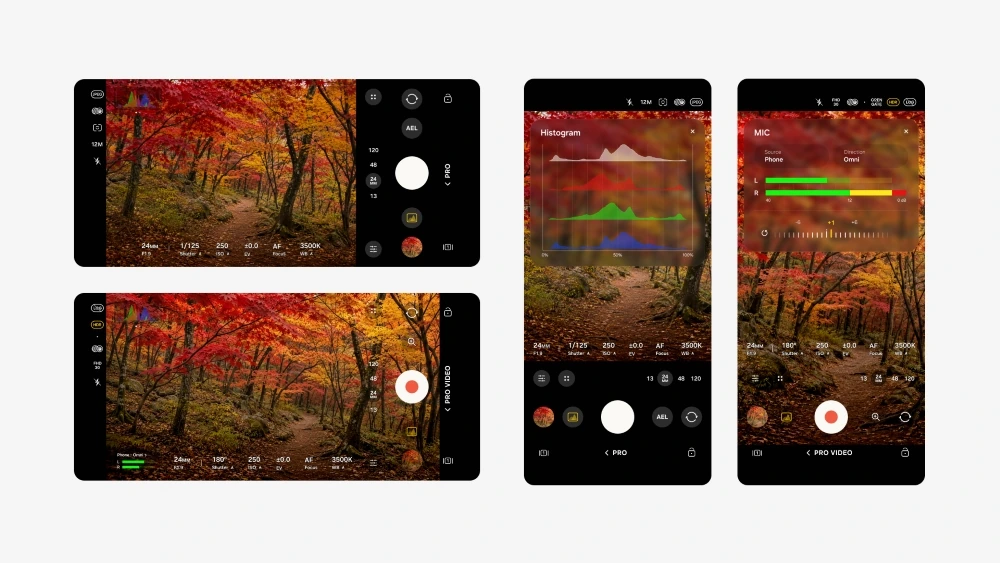
Samsung changed the regular camera and the manual modes. In the standard camera, key controls and the zoom bar are grouped on one screen. That can save a few taps when you have already framed a shot and want to change the zoom before taking it.
Pro and Pro Video gain customizable controls, presets, and more detailed indicators while shooting. Samsung’s screenshots show a brightness histogram and audio level meters in video mode. A histogram can help you spot highlights or shadows that are losing detail. The meters let you see whether the microphone is picking up sound.
Before recording a conversation, you can say a few words and watch the audio meter. That makes it easier to catch a microphone problem before you start filming.
The enhanced controls apply to models with full Pro and Pro Video modes. Samsung excludes Pro Lite and Pro Video Lite in the announcement’s notes. If you usually shoot in the regular automatic mode, the reorganized zoom bar and controls may be the change you notice most often.
Hearing aid controls in the notification panel
Samsung added a floating shortcut for frequently used accessibility controls. A separate change applies to connected hearing aids. The notification panel lets you adjust their volume and choose which sounds from the phone are routed to them.
The announcement names notifications, ringtones, and alarms. You might keep ringtones enabled and turn off notification sounds if they interrupt you too often. The hearing aid needs to be connected to the Galaxy phone. The options available depend on the connected device.
What’s new in Samsung Health?
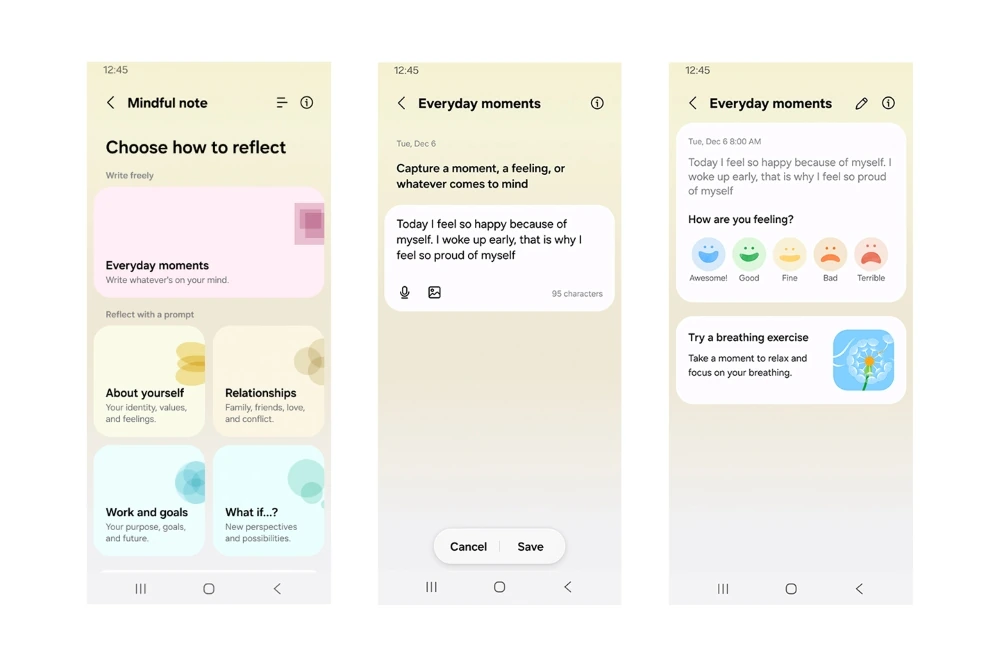
Mindful Note is a journal in Samsung Health. You can write freely about what is on your mind or respond to guided prompts. Samsung says Mindful Note is unavailable on Galaxy Watch.
The Medications section lets you add medicines, vitamins, and supplements, set reminders, and mark doses as taken. Samsung is bringing the section to more markets, and availability still varies by country. Two people on the same One UI version may therefore see different options in Samsung Health.
Installing the beta and going back to a stable version
After enrolling through Samsung Members and getting access, open Settings → Software update → Download and install. The beta can also be installed from the program details in Samsung Members. Samsung distributes beta builds to participants gradually.
Samsung recommends making a backup on a computer with Smart Switch before installing. That is especially relevant if the Galaxy is your main phone. Smart Switch lists the data it can copy. For files and apps you rely on, check that you have a way to restore them.
To make the backup, connect the Galaxy to your computer by USB and allow access on the phone. Open Smart Switch and choose Backup. Check the available categories and select what you need, such as contacts, messages, or apps. Wait for it to finish. After going back to a stable version, you can recover the saved data with Restore.
To go back after installing, first withdraw from the program in Samsung Members. Connect the phone to your computer and select Downgrade in Smart Switch. This resets the phone and removes data created while testing. For a phone that handles daily calls, banking apps, and work messages, waiting for the stable release can save time and disruption.
If the beta is working for you and you stay in the program, Samsung says you can update to the official build once it is available. The Smart Switch rollback is for returning to the previous stable version sooner. The Galaxy S26 announcement has no date for the final build yet.
If you join the beta and run into a problem, use Beta feedback in Samsung Members to report it. Samsung recommends sending the report within three minutes of the error so the relevant logs are included. Keep Samsung Members open until it confirms the report was sent. The beta community has a separate section for suggestions about the interface.



Join the conversation
Stay on topic and respect other readers. Your first comment may appear after editorial review.