
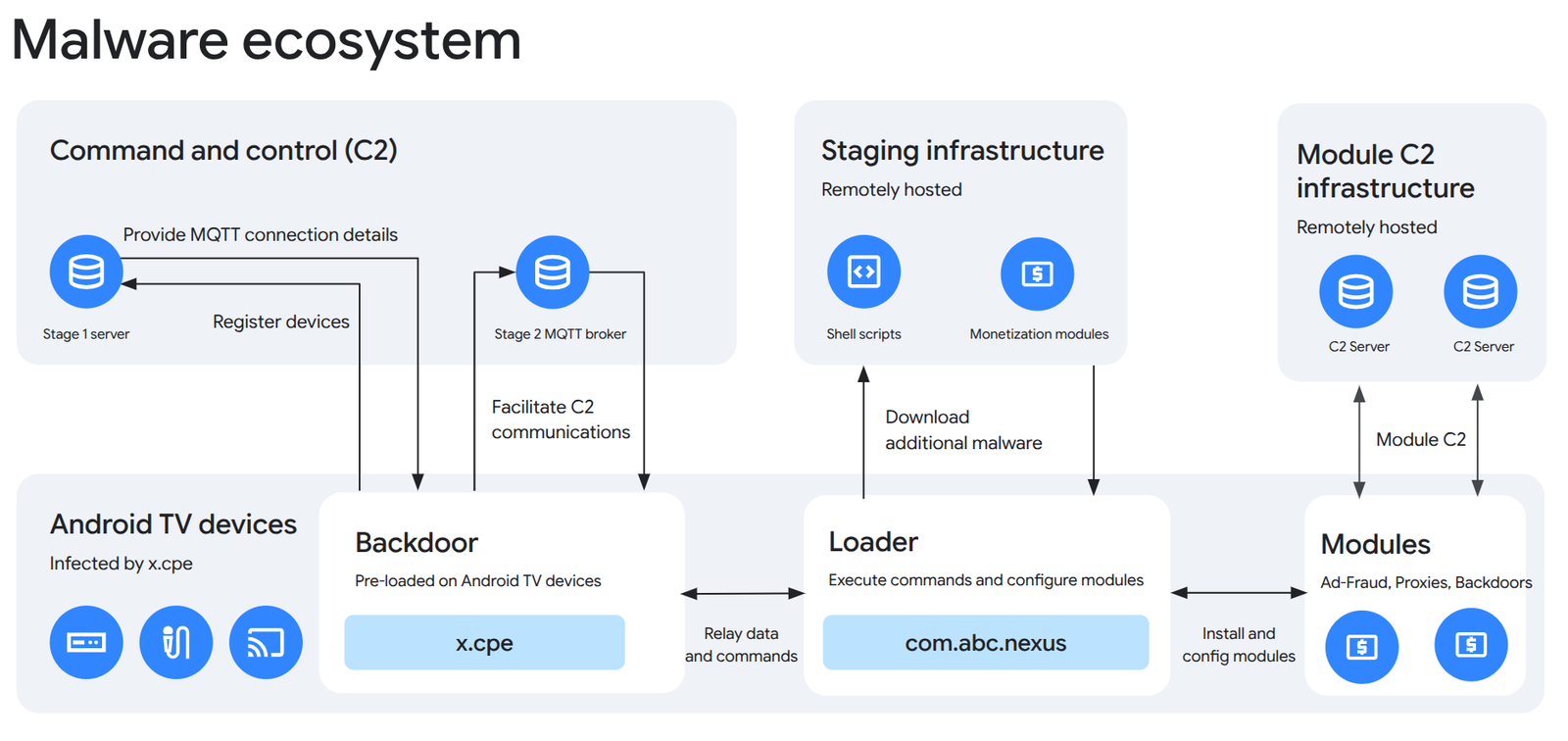
Google and partners reported an operation against XCPE on November 2, involving more than 1.3 million set-top boxes. Operation participant Plume explains that compromised devices used household internet connections without permission, including as proxies carrying other parties’ traffic. Normal video playback could continue.
Google attributes the botnet’s development and operation to manufacturer Videostrong with high confidence; that is the researchers’ attribution. The company also described ending its relationship with the manufacturer. Google’s primary report.
The practical question for an owner is how to identify the box next to the television, find verified information and decide when to stop using it. The following is an editorial checking plan. It does not diagnose a particular box by its appearance, price or the word Android on its packaging.
What this means at home
Google’s technical description places the backdoor in firmware and describes its ability to reinstall after removal. The practical implication is that deleting one application or performing an ordinary reset should not be treated as guaranteed remediation. You need a verified remedy for the particular model and firmware.
The cover is an original Google Threat Intelligence Group diagram, not a self-repair procedure. The full-size illustration is available in Google’s report.
Do not turn a general news story into a personal diagnosis. Slow internet, stalled video or an unfamiliar router entry can have different causes. Equally, the absence of an obvious problem does not answer who maintains the software. First collect identifying information, then compare it with notices from the manufacturer or internet provider.
Step 1: record the exact model and supplier
Compare the label on the box, your order record and the device-information section in Settings. Record the brand, full model name, build number, security patch date, seller and official support address. If your internet provider supplied the device, start there: its records may identify the hardware revision.
Keep these details in one note that you can update after support replies. Do not post a complete serial number, address, order details or an unredacted label photograph in public comments. A model name and software version will usually be enough for a general discussion; send private identifiers only to verified support when necessary.
This also makes it easier to compare two apparently identical boxes. A retailer’s short product name may not be enough to determine whether the devices have the same revision or software. Ask support to identify the relevant version instead of assuming that a forum answer about a similar-looking product applies to yours.
Step 2: check certification and understand its limits
Google describes the path Google Play Store → profile → Settings → About for checking Play Protect certification. Television interfaces may differ; if the option is absent, compare the exact model with the certified-device list linked from that help page. Compatibility certification and Play Protect’s app checking are separate mechanisms. Disabling Play Protect does not fix missing certification.
Do not translate a certification result into “XCPE definitely isn’t present.” Equally, an uncertified result does not identify a particular piece of malware. Record the result and include it with the model in your support enquiry. That produces a more useful question than simply asking whether a device with Android is dangerous.
Step 3: find updates and a model-specific answer
For Google TV, the documented system-update path is Settings → System → About → System update. Other interfaces can use different labels. Google TV help. “No update available” should not be interpreted as confirmation that a security concern is absent: it describes update availability through that channel.
Here is a short message you can adapt:
My model is [name], running build [number]. Is it affected by the XCPE report published on November 2, 2026? If so, which official update addresses it, where are the instructions for my hardware revision, and how can I verify the result? If no remedy is available, what is the replacement process?
This message does not claim the device is infected. It asks for an answer that can be checked. A firmware download without a model, version number and official instructions is not enough reason to install it. Avoid a random “XCPE cleaner” or a package linked in news comments.
Keep the support reply with the device note. If the answer is only “install the latest version,” ask which version they mean and whether it addresses the reported issue. A specific answer gives you a useful before-and-after record; a generic reassurance leaves the original question unresolved.
Step 4: separate device checking from account protection
Play Protect checks applications for harmful behaviour and may warn about, disable or remove them. Google recommends keeping it enabled. Its result does not replace a model-specific answer about the box’s firmware.
If there is a substantiated concern about your device, a cautious interim step is to disconnect it from the network while you seek clarification. This is our risk-reduction recommendation, not a claim that all streaming boxes have been officially recalled. Avoid entering new passwords on a device you currently do not trust.
From another trusted device, review recent Google Account security events and sessions. Unfamiliar sign-ins, changed recovery details or other suspicious activity justify following Google’s account-security procedure. Ending a session and changing a password address account access; they do not repair the streaming box. Our account checklist following a data breach provides additional context.
What a completed check looks like
The useful outcome is more than an absence of alarming messages. You should have the exact model, installed build, support’s answer for that model and an identified next action: a verified fix, an official procedure or an agreed replacement. If verified information is missing, record that as uncertainty rather than marking the device “clean.”
For a future purchase, add three questions to the usual specification list: who supplies updates, where security notices appear, and how you obtain help after purchase. Those answers are more useful than a vague promise of “secure Android” in a product listing. They also give you a contact and a process if another security issue emerges later.


Join the conversation
Stay on topic and respect other readers. Your first comment may appear after editorial review.