
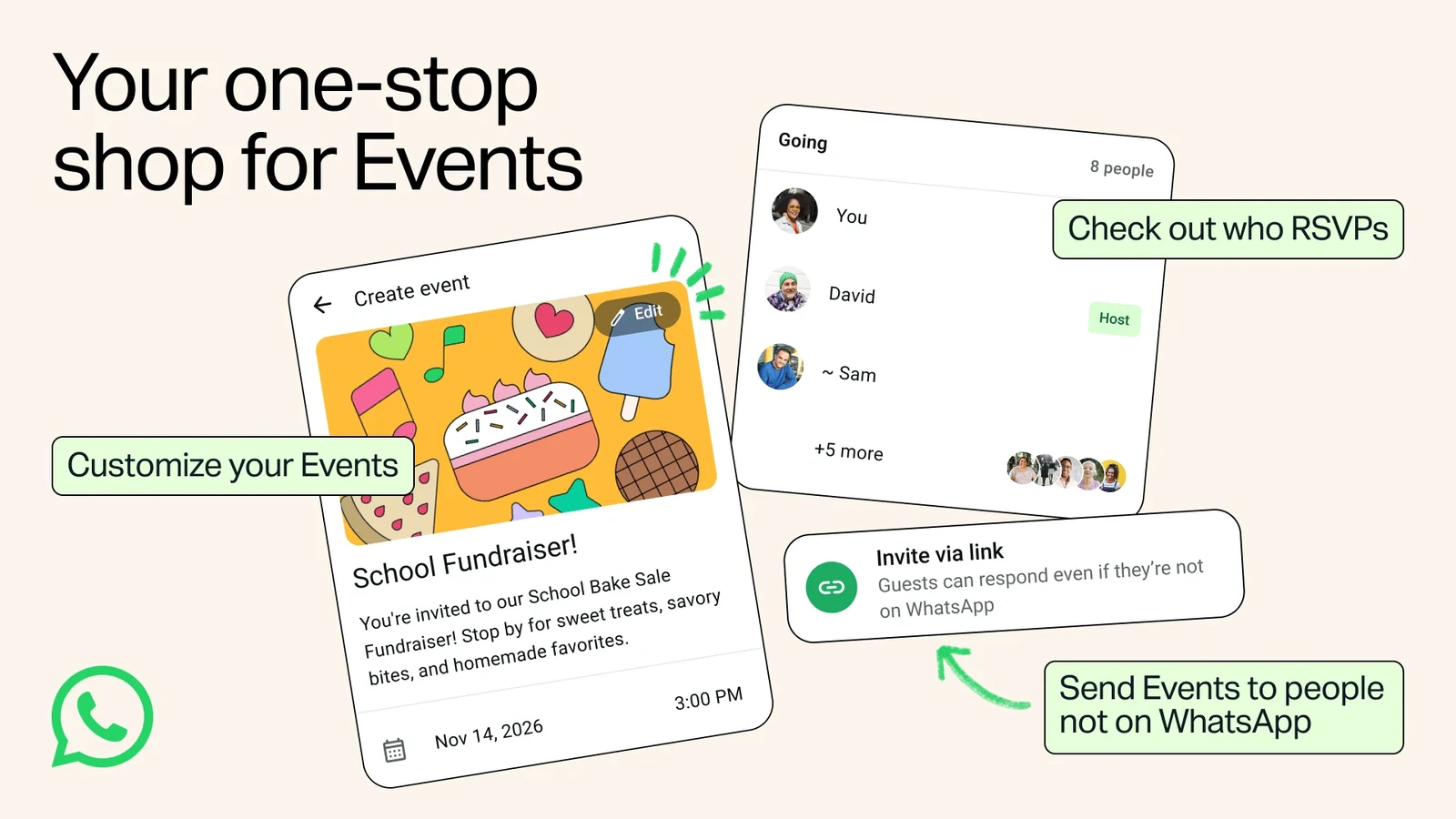
You want to organize dinner without starting another group chat, and two of the people coming do not use WhatsApp. Until now, that usually meant keeping one guest list in the chat and another in text messages. WhatsApp announced an update on November 5 that lets an organizer send an event link to someone without an account. The recipient can open the invitation and RSVP without installing the app. The rollout takes place over the following weeks, so the option may reach friends at different times.
For the organizer: make one invitation everyone can use
The new Settings → Events area brings together past and upcoming events, including ones you created and ones you were invited to. If two versions of a plan are already circulating (“meet at three,” followed by “actually, half past”), use the event card as the place guests can check for the current time.
- Create an event. Give it a name, date and time; add a location if needed. You can add a cover photo, too. For a dinner limited to eight seats, decide up front whether to let a guest bring a plus-one. That choice matters more to the booking than the artwork does.
- Choose “Invite via link.” That is the wording in WhatsApp’s English illustration. Send the link somewhere the recipient already gets messages, such as a text or an email. They do not have to join a group to answer the invitation.
- Check replies on the event itself. A custom reminder is useful when the venue needs a head count by a particular day. Keep “hasn’t replied” separate from “isn’t coming”: silence does not tell you which decision the person made.

For a guest without WhatsApp: what the link reveals
Open the invitation, check the event name, date and time, and respond to say whether you plan to come. RSVP simply means the host is asking for a reply. According to Meta’s announcement, a guest without a WhatsApp account sees the event address after responding to the invitation. A missing street address on the first screen is therefore not necessarily an error. If you need to know roughly how far you would have to travel before committing, ask the host for the neighborhood.
The host’s number is a separate matter. WhatsApp says the organizer’s phone number is not displayed to guests they do not know. That does not conceal anything you write yourself in the cover image, event name or description. For dinner at home, put the address in the location field rather than in a title such as “Dinner at 12 Example Street.” Send a door code directly to the people who will need it.
What to send along with the link
Suppose you are making a restaurant reservation for Saturday. The card can tell guests where and when to meet, but they still need to know when you need their answer and whether to include a companion. Here is wording you can adapt:
Dinner is on Saturday, November 14 at 3:30 p.m. Please reply on the invitation by Thursday and tell me if you’re bringing someone. I’m confirming the table on Friday. You don’t need to install WhatsApp to respond.
If the time changes, update the card. For a last-minute change, contact people who might already be on their way; that saves them from having to guess whether yesterday’s screenshot is still accurate. If an unexpected invitation appears to come from a friend, double-check with them through your usual channel. An event link and a request for your sign-in code are two different things. Our guide to recognizing suspicious messages covers that distinction.
What to do if Events hasn’t appeared yet
Check your usual app store for an available WhatsApp update. Installing the latest version does not guarantee immediate access during a staged rollout. The WhatsApp Help Center also describes the older way to create an event inside an existing chat. It is useful when everyone you want to invite is already there; it is a different route from generating the new link for people without accounts.
If the reservation needs to be made today, send the time and location directly and ask the remaining guests to reply by message. Once the new action appears, your next invitation can use one guest list regardless of which messaging app each person normally uses.


Join the conversation
Stay on topic and respect other readers. Your first comment may appear after editorial review.