
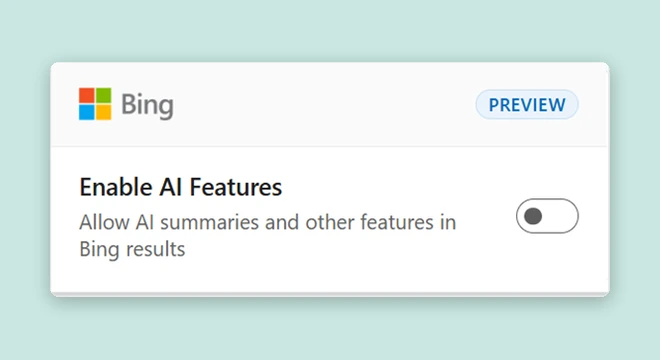
Microsoft has outlined two ways to search Bing without AI-generated answers: add the -ai operator to a query or use the Microsoft Bing AI Search Choice extension. The announcement was published on November 11. The operator is convenient for an occasional search; the extension provides a persistent toggle while also changing other browser settings.
The quick option: add -ai
Open Bing, enter a normal query, then add a space and -ai at the end. Microsoft says this returns results without AI-generated answers. Use a regular short hyphen and leave the operator outside quotation marks.
how to calibrate a monitor for photo editing -aiTry this query in your own browser. After searching, check whether the links you need are visible and the generated answer is absent. When rewriting the query and starting another search, make sure the operator is still included.
For this monitor exercise, look for three different things: the manufacturer’s instructions for your model, an explanation of color profiles, and an example of checking the finished image. This gives each search a clear purpose and tells you which kind of document should answer each question. Having many links is not enough on its own to make the result useful.
Create a Chrome shortcut
For frequent use, Chrome lets you create a separate shortcut. Under Settings → Search engine → Manage search engines and site search, add a Site search named “Bing without AI,” with bai as its shortcut and this URL:
https://www.bing.com/search?q=%s%20-aiChrome replaces %s with your text, while the URL ending adds a space and the operator. Type bai in the address bar, activate the shortcut with Tab or Space, then enter the query. This is a suggested custom setup using Site search. After creating it, check that Bing’s search field contains your query and -ai.
What the extension changes
Microsoft Bing AI Search Choice is in preview and is available for Chrome and Edge. Its switch controls AI answers in Bing. There is an important installation condition: it sets Bing as your default search engine. The Chrome Web Store description also explicitly says it opens Bing on every new tab.
Consider these changes before installing. If you only need one search without a summary, the operator addresses that task. If you use Bing regularly and want to switch answer formats, decide whether the address-bar and new-tab changes also suit your browsing habits.
- Follow the appropriate Chrome or Edge store link from Microsoft’s official announcement, listed in the sources.
- Check the extension’s name. The Chrome Web Store listing identifies Microsoft Corporation as the publisher.
- Read its description and permission request, install it, and open its icon beside the address bar.
- Switch off Enable AI Features, run a new Bing search, and inspect the result.
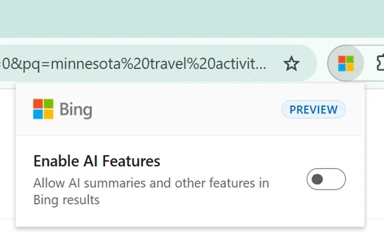
As this is a preview, the interface can change. Identify the control by its name and description rather than relying only on the position shown in an illustration.
Check three changes separately
| Where to check | What to assess |
|---|---|
| Bing results page | Whether the search has the appearance you wanted, without a generated answer. |
| Address-bar search | Which search engine opens when you enter a new query. |
| New tab | Whether the page that now appears fits your workflow. |
Compare the same query within the same session. Changing the subject, language, and browser simultaneously makes it harder to identify what one switch did. Keep a record of the useful outcome: for example, the manufacturer’s manual and a page explaining profiles.
Restore the settings you prefer
In Chrome, open Extensions → Manage extensions and use Remove to uninstall the extension. Check your search engine separately under Settings → Search engine → Change. Open a new tab after removal to check that behavior too.
In Edge, remove the extension through Extensions → Manage Extensions → Remove. The search-engine setting is under Settings → Privacy, search, and services → Search and connected services → Address bar and search. If the new-tab page still needs adjustment, check Start, home, and new tab page.
The AI switch controls Bing’s answer format. After opening a result, still assess its author, date, and supporting evidence. Our article on Edge product comparisons, coupons, and cashback offers a practical example: check each part of an offer separately before relying on the combined impression.


Join the conversation
Stay on topic and respect other readers. Your first comment may appear after editorial review.